![logo_white_noballoon_735x250.png]](https://help.deedmob.com/hs-fs/hubfs/logo_white_noballoon_735x250.png?width=147&height=40&name=logo_white_noballoon_735x250.png)
What is the waitlist?
The waitlist is a feature for activities/opportunities with a Direct Application Flow (RSVP) with a set capacity. When your activity/opportunity is full and a new person wants to join, they are automatically placed on a waitlist instead of being turned away. If a spot opens up — for example, when someone withdraws — the first person on the waitlist is automatically promoted and notified.
This means you never miss a potential applicant, and you don't need to manually manage the queue.
How do I enable the waitlist?
To enable the waitlist, your activity/opportunity needs two things:
- A limited capacity — a maximum number of participants.
- A Direct Application Flow (RSVP) — where people join directly instead of applying for approval.
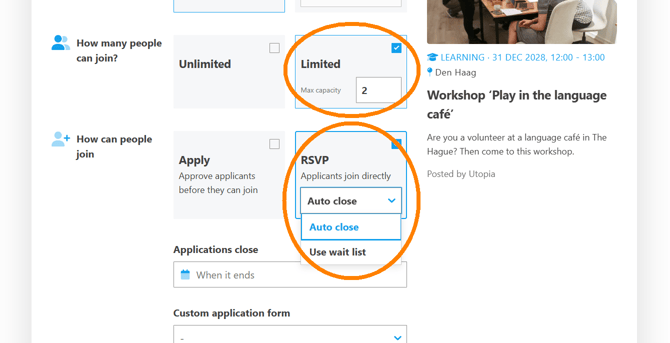
Here's how to set it up:
- Edit your activity/opportunity form.
- Under 'How many people can join?', select Limited and enter the maximum number of participants.
- Under 'How can people join', select RSVP.
- A dropdown will appear with two options: 'Auto close' and 'Use waitlist'. Select Use waitlist.
That's it! Your activity/opportunity now has a waitlist.
TIP: If you don't see the dropdown, make sure you have both a limited capacity set and the Direct Application Flow (RSVP) selected. The waitlist option is not available for regular application-based activities/opportunities.
What do applicants see?
When spots are available
Applicants see the regular Join button with a checkmark icon. They can join immediately and are accepted right away.
When the activity/opportunity is full
Once the activity/opportunity reaches capacity, the button changes to Join waitlist (with a bell icon). Applicants will see the prompt: "Join waitlist?"
If no one is on the waitlist yet, they'll see an encouraging message: "Be the first on the waitlist!"
After joining the waitlist
After joining, the visitor sees a confirmation: "You're on the waitlist." They also see an On Waitlist label next to their status. They can withdraw from the waitlist at any time.
What happens when a spot opens up?
When a person withdraws or an organiser removes a participant, the system automatically:
- Checks if there are people on the waitlist.
- Promotes the person who has been waiting the longest (first come, first served).
- Changes their application status from Waiting to Going.
- Sends an email to the promoted person with the subject: "We found you a spot on [activity/opportunity title]!"
- Sends a notification to the organiser as well, letting you know that an attendee was promoted from the waitlist.
This happens automatically — you don't need to take any action.
Can I manage the waitlist manually?
Yes. As an organizer, you can view all applications grouped by status — including those on the waitlist. From the activity/opportunity's applications tab, you can manually change the status of any application — for example, moving a waitlisted applicant to Accepted, or rejecting them.
Note: When you manually change an application's status, the automatic waitlist promotion emails are not sent. Only automatic promotions (triggered when a spot opens up) send notifications.
Can I disable the waitlist after enabling it?
Once your activity/opportunity has applications, the Direct Application Flow (RSVP) and Limited Capacity settings are locked and cannot be changed directly. This prevents accidental disruptions for people who have already joined or are on the waitlist.
If you need to disable the waitlist on an activity/opportunity that has no applications yet, simply switch the Direct Application Flow (RSVP) dropdown from "Use waitlist" to "Auto close". You can also remove the capacity entirely by switching to Unlimited.
When you remove the waitlist, a confirmation dialog will appear explaining that any people currently on the waitlist will be automatically moved to 'Going'. You can then confirm or cancel the change.
Good to know
- The waitlist is only available for Direct Application Flow (RSVP) activities/opportunities — not for regular application-based activities/opportunities.
- People are promoted in the order they joined the waitlist — first come, first served.
- Both the promoted applicant and the organiser receive an email notification when someone is automatically promoted.
- The waitlist works at the activity/opportunity level, not per individual timeslot.
- You can see how many people are on the waitlist from the activity/opportunity detail page.
We wish you happy waitlisting!