![logo_white_noballoon_735x250.png]](https://help.deedmob.com/hs-fs/hubfs/logo_white_noballoon_735x250.png?width=147&height=40&name=logo_white_noballoon_735x250.png)
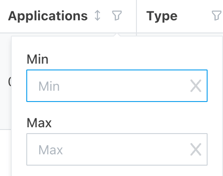
The applications column in the activity overview is a handy place to see which activities are doing well and which aren't. It shows you how many applications an activity has. It can help you spot useful insights, support organisations in their work, and pick up best practices you can share:
- Enter "0" in the max filter to find activities that haven't received any interest from volunteers. With this information, you can:
- Offer extra support to the individual organisations by suggesting improvements, helping them promote the role or promote the roles yourself for extra visibility
- Identify patterns, such as whether those roles fall into similar categories (for example, fundraising or community engagement) or whether the role descriptions might be too brief or unclear for volunteers to make an informed choice. Use this information to support organisations by giving extra promotion to unpopular roles or creating recommendations.
- Identify popular roles (e.g. roles with at least 4 applications) and identify patterns to find out why they are doing so well. These can be used as (data-based and proven) best practices for other organisations to learn from.
- You can use the data to identify trends and to highlight the most popular roles in your reports.